
How to Put Your Car Club Online: A Free Page, an Invite Link, a Roster and Dues
Most clubs run on a group chat and one person's spreadsheet. Here is how to give yours a page, get every member onto it, and keep the roster, dues and meets in one place.
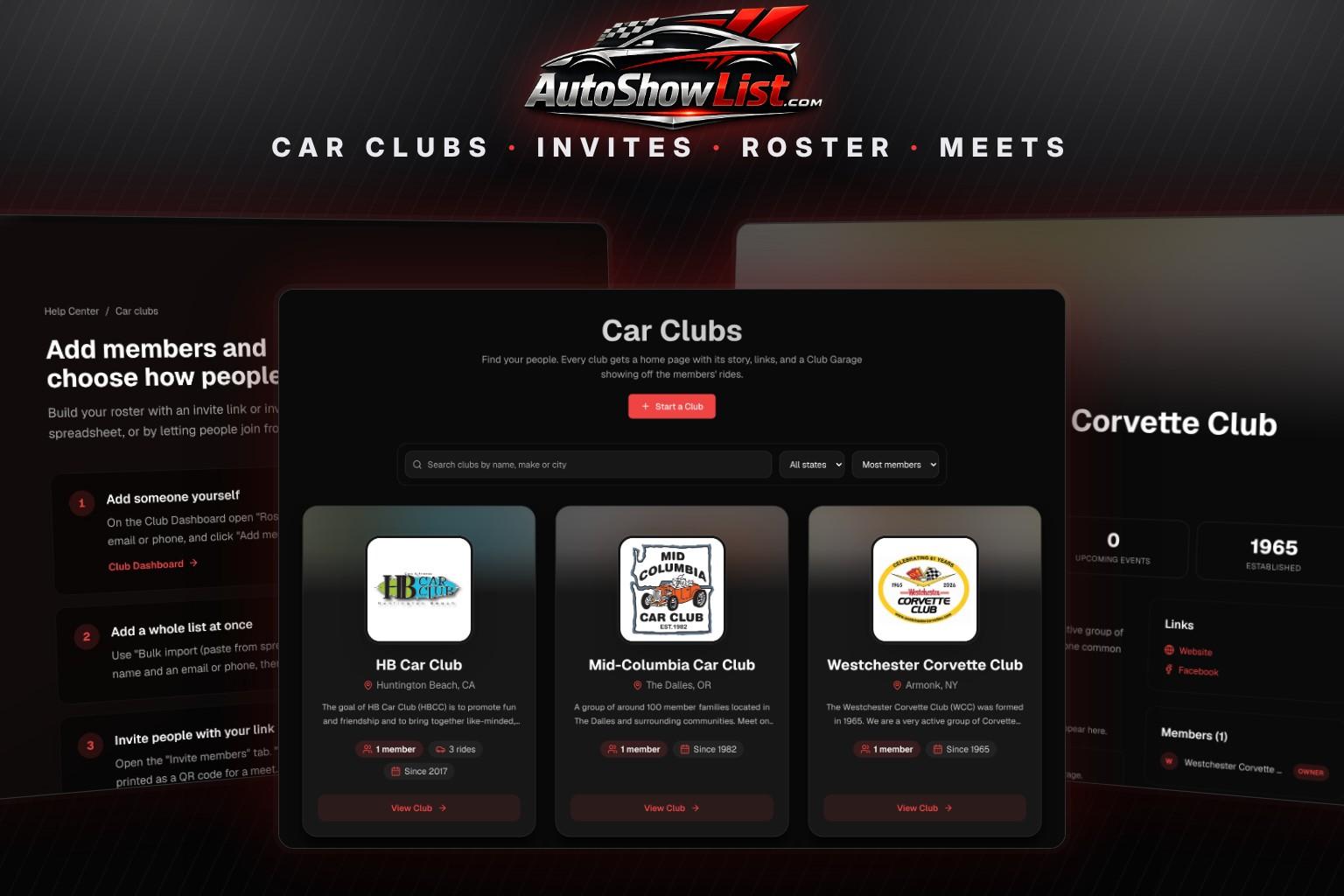
Ask a club president where the member list lives and you usually get three answers: a Facebook group, a group text, and a spreadsheet on somebody's laptop. None of them agree. The treasurer is not sure who paid this year, and a newcomer who finds the club at a cruise night has nowhere to go except "find us on Facebook".
A club page on AutoShowList is built to be that one place. It is free to start, it is live the minute you save it, and the tools behind it cover the four jobs every club officer ends up doing by hand: getting people on the list, knowing who has paid, telling people about the next meet, and showing off the cars. This guide walks through each one in the order you will do them.
Step 1: Create the Page
Go to the Car Clubs page and click Start a Club. You sign in with Google or with a link we email you. There is no password to remember. Then fill in the form:
- Club name, at least 3 characters
- An About section. Two or three sentences on who you are and what you drive is enough to start
- City and state, so people nearby can find you
- The year the club was founded
- Your logo
- Your website, Facebook and Instagram links
Save it and the page is live. You land on the Club Dashboard, which is where everything else in this guide happens.


Spend a minute on the logo. It is the first thing on your card in the directory, on your club page and on the page people see when they open your invite. If your only copy is a photo of a jacket patch, that still beats a blank square, and you can replace it later under Settings.
Step 2: Get Your Members Onto the Roster
A club page showing one member does not look like your club. This is the step most officers skip, and it is the one that makes the page worth having. There are four ways to do it, and you can mix them.

The invite link
Open the Invite members tab and copy your invite link. Paste it into the group chat or pin it in your Facebook group. Anyone who opens it and signs in is on the roster right away, with no approval step, and counts toward the member total on your page.
The QR code
The same tab has a QR code for that link. Print it and tape it to the sign-in table or the cooler at your next meet. People scan it while they are standing there, which is the only time some members will ever do it.
Invite emails
For the members who are not on Facebook, enter up to 50 email addresses at a time, add a short note, and click Send invites. Each person gets one email with your link, and replies come back to you. They are listed under Invites sent until they join.
Typing or pasting a list
If you already have that spreadsheet, use it. The Roster tab has a bulk import: paste one person per line with a name and an email or phone. Members you add by hand can be sent the invite link afterward with one click, so they can sign in and connect their cars.
Step 3: Decide Who Can Join
Under Settings there is a switch called "Anyone can join right away". A new club starts with it on, so a visitor who clicks Join Club on your page is in. Turn it off and the button reads Request to Join. You get an email for each request and approve or decline it from the Requests tab. Your invite link lets people straight in either way, since you are the one who handed it out.
A free club holds up to 15 members. When it is full, nobody is turned away. New people go on a waiting list, you get an email, and you can admit one whenever a spot opens.
Step 4: Track Dues Without a Spreadsheet
In Settings, enter your dues amount and whether they are annual, monthly or not charged at all. From then on the roster shows each member as Paid, Due soon, Overdue, Lapsed or No record, with the date they are paid through. When someone hands you a check or sends a payment, click the dollar-sign icon on their row to record it.
One thing to be clear about: the site tracks dues, it does not collect them. Money still moves however your club already moves it. What changes is that the answer to "did Dave pay?" is on a screen any officer can open.
Step 5: Post Meets and See Who Is Coming
The Events and RSVPs tab is for club business: the monthly breakfast, a garage tour, the caravan to a show two towns over. Enter the title, date and time, location and any details. Each event gets its own page, linked from your club page, where members RSVP as going, maybe or can't make it and can add guests. The dashboard shows the headcount, which is the number the restaurant is going to ask you for.
Switch on Members only when a meet is not open to the public. It still appears on your club page with a members-only tag, but only people on your roster can RSVP. A free club can have 2 upcoming events at a time.
A club event is for your club. If you are putting on a public show, post it to the main calendar as well. Our guide on how to organize a car show covers the planning, and listing it is free.
Step 6: Fill the Club Garage
Every club page has a Club Garage section. It fills itself: when a member on your roster has a car in The Garage with a finished public profile, that car appears on your club page automatically. Ask members to add their cars over the winter. Twenty build pages under your logo tells a visitor more about the club than any About paragraph.
What Is Free and What Club Pro Adds
Everything above is free: the page, the logo, the invite link, QR code and emails, the roster, dues tracking, events and the Club Garage. The free plan has two limits, 15 members and 2 upcoming events.
Club Pro is $19 a month. It removes both limits, lets everyone on your waiting list in at once, and adds dues reminder emails: one click sends a reminder to everyone whose dues lapse within 30 days or have already lapsed. You can cancel it any time from Billing.
Frequently Asked Questions
Is a car club page on AutoShowList really free?
Yes. Creating the page, inviting members, keeping a roster, tracking dues and posting club events cost nothing. The free plan holds up to 15 members and 2 upcoming events. Club Pro at $19 a month removes those limits and adds dues reminder emails.
How do members join my club page?
The fastest way is your invite link, found on the Invite members tab of the Club Dashboard. Share it in a group chat, print it as a QR code, or send it by email to up to 50 addresses at a time. Members can also click Join Club on your public page.
Does AutoShowList collect club dues?
No. It keeps the record of who has paid and through what date, and with Club Pro it sends reminder emails. The money is collected however your club already does it.
Can I keep club events private?
Yes. Mark an event Members only and only people on your roster can RSVP. You can also turn off the public directory listing in Settings if you do not want the club shown on the Car Clubs page.
Start Tonight
Setting it up takes a few minutes, and the invite link does the rest. Start your club page, then drop the link in the group chat. For a look at everything else on the site, see our tour for organizers, vendors, clubs and car owners, and if you are still gathering your first members, read how to start a car club. Need a destination for the first club outing? Browse upcoming shows.
Keep Reading
Find Your Next Car Show
Browse hundreds of upcoming shows, cruise-ins, and meets near you.
Browse Events