
What AutoShowList Does Now: A Tour for Organizers, Vendors, Clubs and Car Owners
Show season is winding down, which makes it a good time to look at what the site can do. Here is what is new and what is free for organizers, vendors, clubs and anyone with a car worth showing.
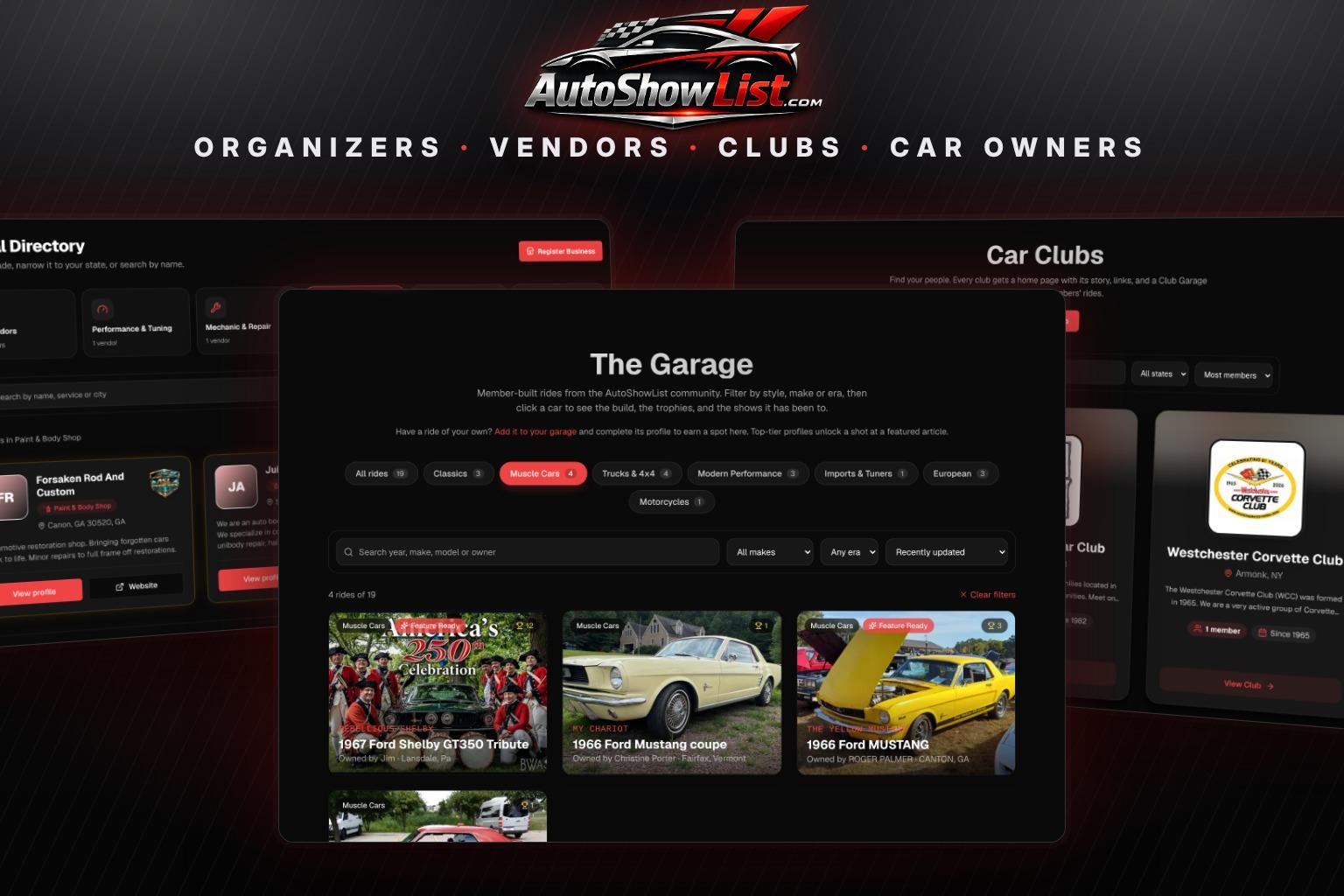
AutoShowList started as a calendar: a place to find a car show near you this weekend. It still is that, but over this season it grew into something four different groups use for four different jobs. Organizers post shows and take entry fees. Vendors get found by the people walking those shows. Clubs run their roster and their meets. Owners give their cars a page of their own.
With most of the country putting cars away for the winter, this is the quiet stretch where next year gets planned. So here is a tour of what the site does today for each group, what it costs (most of it is free), and what we added this fall. Every screenshot below is the live site.
For Show Organizers: List It Free, Then Run It From Your Phone
A Basic listing is free and goes on the calendar and the map as soon as you submit it. A Standard listing is $14 and adds your flyer, a full description, a photo gallery, your registration links, entry and spectator fees, and a printable QR flyer you can tape up at the parts store. Featured is $29 and puts the show on the homepage for 30 days, at the top of search results, and in our Friday email to subscribers in range. Dates for 2027 are already going up, and an early listing has all winter to be found.

The listing is only the start. These tools sit on the event page itself:
- Recurring series. Enter a weekly Cars and Coffee or a monthly cruise night once, add every date, and each date gets its own listing and link.
- Entry fees paid online. Connect your own Stripe account and entrants can pay on your listing and get a QR ticket. You receive your full posted entry fee, less Stripe's card processing cost. A 5% service fee is added on top and paid by the entrant.
- Gate check-in. See everyone who paid and check them in from your phone.
- People's Choice voting. The crowd votes from their phones with no account needed. With two or more award classes, each person gets one vote in every class. Voting opens on show day, so nobody stuffs the ballot a week early.
- Cancel or postpone. Rained out? Mark it, and everyone who RSVP'd gets an email while the page stays up with a clear notice.
Two smaller things changed this fall. Your dashboard Settings now has an Organizer Name field, so a church or club show is listed under the organization and not a volunteer's first name. And if we already added your show from a flyer, you can claim it and make it yours instead of posting it twice. If you run several shows a year, the Organizer Season Pass is $199 a year for unlimited Standard listings. Planning your first one? Our guide on how to organize a car show covers the venue, permit and judging side.
For Vendors: A Directory People Can Actually Search
The vendor directory used to be one long list. Now it opens with a row of trades, such as Paint and Body, Mechanic and Repair, Towing, and Parts and Accessories, and one tap narrows the list to that trade. From there a visitor can filter by state, search by name, service or city, or tap Near me and set a distance to see who is closest.

A basic vendor profile is free: your business, your trade, your location and a link to your website. Founding Vendor is $59 a year and adds the parts that bring in calls:
- Your phone, email and contact details shown on the profile
- A Get a Quote button. The visitor fills in what they need and the request lands in your inbox, with their address as the reply-to so you answer them directly
- Customer reviews, a verified badge and placement ahead of free profiles
- Your logo, a banner and a photo gallery of up to 8 pictures of your work
Working a particular show? Vendor Boost features your business on that one event page for $15. And if your shop is already in the directory because we added it, you can claim the profile and take it over.
For Car Clubs: A Home Page, an Invite Link and a Roster
This is where most of the fall work went. Starting a club page is free and takes a few minutes: name, story, city, the year you were founded, your links and your logo. The logo now leads everything. It is the first thing on your card in the Car Clubs directory, on your club page and on your invite page.


The hard part of any club page is getting members onto it, so there are now four ways to do that:
- An invite link. Copy it into your group chat or Facebook group. Anyone who opens it and signs in is on your roster right away.
- A QR code. Print it and set it on the table at your next meet.
- Invite emails. Enter up to 50 addresses at a time, add a note, and each person gets your link. Replies come back to you.
- The Join Club button on your page, which can let people straight in or hold them for your approval. Your choice.
Behind the page is a Club Dashboard with a roster (type members in or paste a whole list from a spreadsheet), dues tracking that shows who is paid, due soon or overdue, and club events where members RSVP as going, maybe or can't make it. Cars your members have made public in The Garage show up on your page automatically as the Club Garage.
A free club holds up to 15 members and 2 upcoming events. Past 15, new people go on a waiting list instead of being turned away, and you get an email. Club Pro is $19 a month, removes both limits and adds dues reminder emails. If you are still at the stage of gathering people, start with our guide on how to start a car club. For the full setup, see how to put your car club online.
For Car Owners: The Garage, Now Sorted by Style
The Garage is where members give their car its own page: photos, build story, mods by category, trophies and the shows it has been to. Enough cars have been added that scrolling through all of them stopped working, so the top of the page now has style buttons. Tap Muscle Cars, Trucks and 4x4, Classics, Imports and Tuners, European or Motorcycles and you see only those. You can narrow further by make and era, search by year, model or owner, and sort the results.

The site works out a car's style from its year, make and model, and you can set it yourself under Edit Profile if it guessed wrong. To appear publicly a car needs a primary photo, a build story of 100 words or more, two specs filled in and two gallery photos. Once it is up, you can print a windshield card with a QR code for your dash, so people scan it and read the whole build instead of asking you the same five questions all day.
Profiles that go the extra distance earn the Feature Ready badge, and those are the cars we pick from for Member Spotlight articles, like Jim's 1967 Shelby GT350 tribute. Winter is a good time to write the build story you have been putting off. Add your car here.
For Everyone Who Just Wants to Find a Show
None of the above needs an account to browse. Car Shows This Weekend has a near-me mode with a 25 to 200 mile radius. The Events page filters by state, date, vehicle type, format and price. Set your filters, click Save this search, and new shows that match are emailed to you on Friday mornings. The Road Trip Planner strings several shows together and gives you the driving distance and time between them.
One note we repeat everywhere: a fee shown as "Not listed" means the organizer has not published it. It does not mean the show is free. And we list shows, we do not run them, so questions about a show go to its organizer through the links on the listing.
One Dashboard and a Help Center
Plenty of people wear more than one hat. The same person runs a show, belongs to a club and owns a car in The Garage. Your dashboard now opens with a card for each: your shows, your vendor profile, your clubs and your garage, with what your plan includes shown on the card.

If you get stuck, the Help Center has step-by-step guides for every job in this article, written with the exact button names you will see on screen.
Frequently Asked Questions
Is it free to list a car show on AutoShowList?
Yes. A Basic listing is free and puts your show on the calendar and the map right away. Standard ($14) and Featured ($29) are optional upgrades that add your flyer, a full description, links and extra placement.
How do I get my car club members onto our club page?
Open the Invite members tab on your Club Dashboard. You can copy your invite link into a group chat or Facebook group, print the QR code for a meet, or send invite emails to up to 50 addresses at a time. Anyone who opens the link and signs in is added to your roster and counts toward the member total on your page.
How much does it cost to be in the vendor directory?
A basic profile is free. Founding Vendor is $59 a year and adds your contact details, a Get a Quote button, reviews, a verified badge, priority placement and a photo gallery. It renews yearly until you cancel from Billing.
How do I get my car into The Garage?
Sign in, open My Garage in your dashboard and click Add Vehicle. To show publicly the car needs a primary photo, a build story of at least 100 words, two specs and two gallery photos. Then tick the box to show it publicly.
Do I need an account to find car shows?
No. Browsing the calendar, the map and This Weekend needs no account. You only need a free account to save a search, RSVP, post a show, start a club or add a car.
Pick Your Starting Point
Running a show next year? Post it now so it has all winter to be found. Have a club? Start its page and send the invite link tonight. Own a shop? Get in the directory. And if you just want something to do on Saturday, browse what is coming up.
Keep Reading
Find Your Next Car Show
Browse hundreds of upcoming shows, cruise-ins, and meets near you.
Browse Events