
Adding CarPlay or Android Auto to a Classic Car Without Ruining the Dash
Maps, calls and music on a screen in a car built before screens. Here are the ways to add CarPlay or Android Auto from least to most invasive, and how to keep the original dash intact.
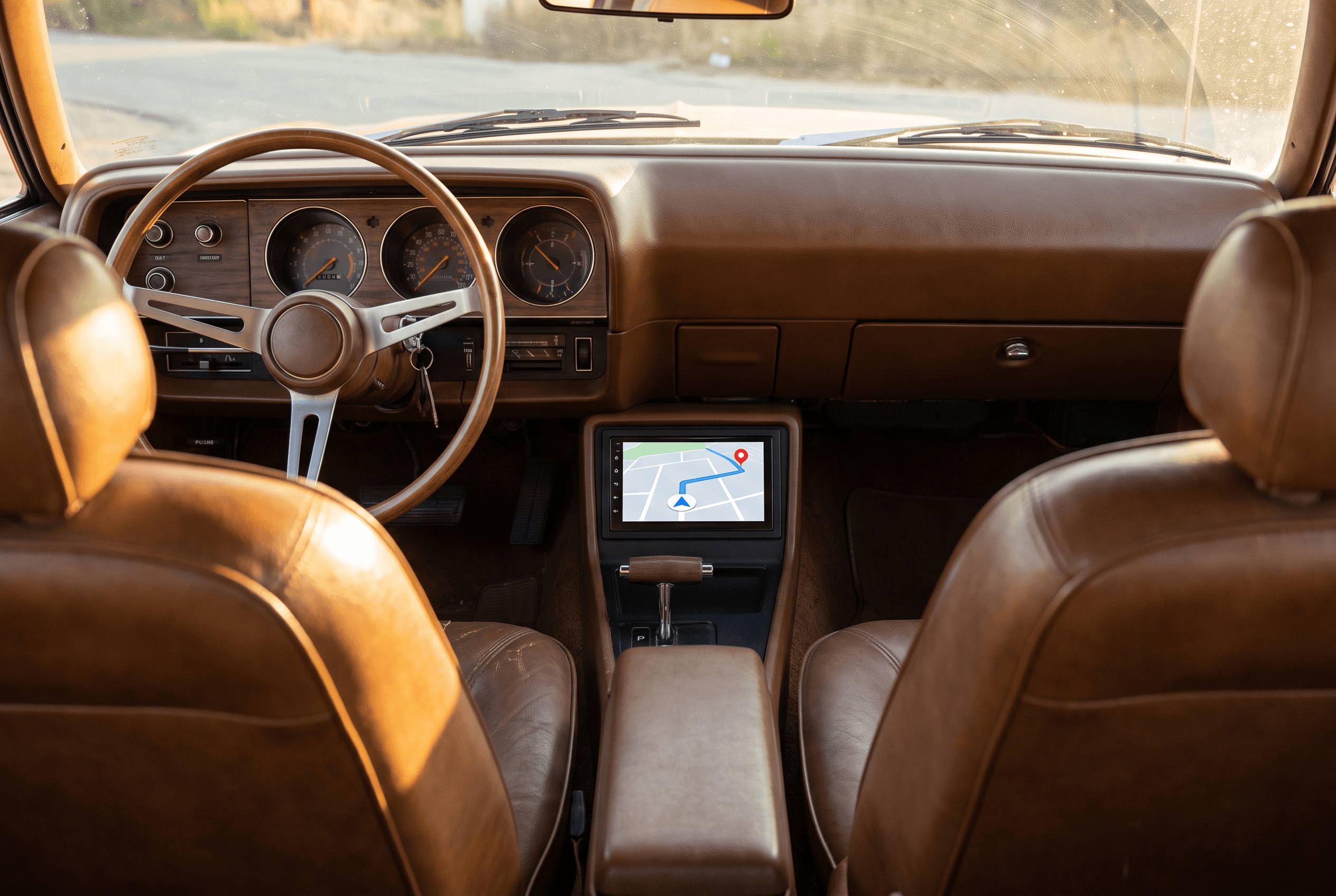
You can add Apple CarPlay or Android Auto to a classic car without cutting the dash. The least invasive route is a portable screen that plugs into the lighter socket and sends audio to the car's speakers. Next comes a hidden setup, with the head unit out of sight and the screen in the glovebox, console or a removable mount. Further along are retro-look radios paired with a separate screen, and at the far end a modern double-DIN or floating-screen head unit, which almost always means changing the dash on anything older than the 1980s.
Which one suits you comes down to two questions: how much the car is judged on originality, and whether you can live with a screen that comes out when the car is parked at a show. Answer those first and the rest of this guide narrows itself down. The rule that ties every option together is the same one that applies to any electronics in an old car: keep the original parts, use existing openings and mounting points, and make sure the whole job can be undone.
What CarPlay and Android Auto Actually Need
Neither system lives in the car. The phone does the work and projects its interface onto a compatible screen, so a retrofit needs four things: a display or head unit that supports CarPlay, Android Auto or both; clean 12-volt power; a way to get sound into the car's speakers; and a microphone for calls and voice commands. A plain Bluetooth radio covers music and calls, but it won't show maps or messages, because it has no projection screen.
Check one detail before you buy anything: wired versus wireless. Some units support only a USB connection, some support wireless CarPlay and Android Auto as well, and the two phone systems are not always supported equally on the same unit. Read the current spec sheet for the exact model rather than the product title, and confirm your phone is on the maker's compatibility list.
Option 1: A Portable Screen (No Tools, Fully Reversible)
Portable CarPlay and Android Auto screens are the cheapest and least invasive way in. They are sold in sizes from about 5 to 10 inches, mount to the dash or windshield, and plug into a 12-volt lighter socket. Most can send audio three ways: through a built-in speaker, through an FM transmitter to the car's radio, or through an aux cable if the radio has an input. Many add a dash camera or a reversing-camera input.
The trade-offs are honest ones. Sound through an FM transmitter is only as good as the station-free frequency you can find, and on a car with an AM-only original radio it won't work at all, so plan on the built-in speaker or a hidden Bluetooth amplifier like the ones in our hidden audio upgrades guide. Suction cups and adhesive pads can let go after a long run of summer heat on a sunny dash, so look at how the mount is built before the screen. And check whether the car has a lighter socket at all, and what voltage it carries: on a 6-volt car, a 12-volt screen needs a converter.
The big advantage for a show car is that it's gone in ten seconds. Unplug it, put it in the glovebox, and the dash is exactly as the factory built it. If you go this way, the searches to start with are portable wireless CarPlay screens and, if your lighter socket is loose or missing, a fused 12V socket mounted under the dash.
Option 2: A Hidden Head Unit With a Concealed Screen
A hidden install puts the working parts where nobody looks. Hidden "brain" units such as Custom Autosound's Secretaudio line already sit under a seat or in the trunk with a small remote display, and installers use the same idea for screen-based units: a compact head unit mounted in the glovebox, under the dash or in a custom console, with the original radio left in the dash for looks. Classic Car Stereos describes mounting DIN-size units in the glovebox, under the dash, or wherever else they can be hidden, and fitting compact receivers in a glovebox or custom console.
Where the screen goes is the real design decision. Common answers are inside the glovebox door, in a center console that a later model of the car used, or on a removable mount that clips onto a bracket under the dash and lifts off for shows. Keep the screen within easy reach and below the driver's sight line to the road, and route the USB cable and microphone lead behind trim, not across it.
This route keeps an uncut dash and a working original radio, and the price is installation time: every power, ground, speaker and camera wire runs fresh. It is the setup to ask a shop for if you want CarPlay on a car that is still judged on originality.
Option 3: Retro-Look Radios and Where They Fit In
Retro-look radios that fit the factory shaft opening are the go-to for modern sound behind a period face, but check what they actually offer before buying one for phone projection. RetroSound's current lineup, for example, lists Bluetooth, USB, HD Radio and its own phone app across its radio "motors," with no CarPlay or Android Auto, and Custom Autosound's shaft-style USA-series radios are built around Bluetooth, USB and aux inputs as well. These radios give you streaming, calls and a correct-looking face, but no maps on a screen.
That makes them half of a good combination rather than the whole answer. A retro-look radio in the dash for audio plus a portable or hidden screen for navigation gives you a stock-looking dash, decent sound and CarPlay when you want it. Feed the screen's audio into the radio's aux or Bluetooth input and the car's speakers do the work.
One maker has closed the gap for its own cars. Porsche Classic sells the Porsche Classic Communication Management, a single-DIN unit with Apple CarPlay for older 911s and other models with the narrow-format radio opening, and a double-DIN version for the 986 and 996. It is the clearest example of a factory-backed CarPlay radio for a classic. Before buying any period-look unit, check the maker's current fitment and feature list for your exact year and model, because ranges change.
Option 4: A Modern Double-DIN or Floating-Screen Unit
The most complete integration is a modern head unit with a large touchscreen, wireless CarPlay and Android Auto, camera inputs and a proper amplifier. The problem in a classic is space. Most dashes built before the 1980s have a shaft-style opening that is far smaller than the 7-by-4-inch double-DIN standard, so fitting one means cutting the dash, replacing the center panel or building a console.
Two ways to stop short of a saw:
- A floating-screen unit. Some head units put a large screen on a single-DIN chassis. Alpine's Halo9 line is the familiar example: the 9-inch screen mounts in front of the dash on an adjustable bracket, with several height and depth positions and a tilt adjustment. It still needs a single-DIN opening, which many classic dashes don't have, so it suits cars with a later-style dash or a console.
- An under-dash pod or console. A bolt-on pod under the dash or a custom center console can hold a double-DIN unit with the original dash untouched above it. Mount it to existing bolt holes where you can, and keep the pod removable.
If the dash does have to change, buy a spare or reproduction dash panel and cut that one, so the original goes on a shelf. A modern screen in the dash usually takes a car out of originality-judged classes, but in restomod and modified classes a clean, well-finished install is fine. Our guide to restomod vs restoration covers how that choice plays out with judges and resale.
Wiring Basics Before You Buy
- Voltage and ground polarity. CarPlay units, like nearly all modern car electronics, are built for 12-volt negative ground. Many American cars from before the mid-1950s run 6 volts, and many British cars, among others, were built positive ground. Look at which battery post goes to the chassis before you buy. A 6-volt car needs a properly rated converter or a 12-volt conversion. On a positive-ground car, a standard unit's case and USB ground can short to the battery, so convert the car or get the installer to isolate the system fully.
- Switched and constant power. A head unit wants a constant feed for memory and a switched feed that turns it on with the key. Many old cars have very few switched circuits, so take the switched feed from a fused accessory source or a relay, not by splicing into the ignition wire.
- Fusing and grounds. Fuse every new power feed at its source and ground to clean, bare metal. An add-a-circuit fuse block under the dash keeps new feeds separate from the original harness.
- Microphone and USB. Mount the microphone near the headliner or the top of the steering column, away from vents and the heater fan. Run a good-quality USB cable for wired CarPlay; cheap cables are a common cause of dropouts.
On a generator-equipped car, a screen and head unit draw modest current and are rarely a problem, but adding a big amplifier at the same time is a different story. The hidden audio guide covers charging capacity, amplifiers and speakers, so this guide doesn't repeat them.
Keep the Original Radio and Make It Reversible
Whichever option you choose, keep the original radio, knobs, bezel and brackets together in a labeled bag. Even a dead original radio is worth leaving in the dash if the new system is hidden, because a blank hole is the first thing a judge or buyer notices. Photograph the wiring before you take anything out, label every new wire at both ends, and use plug-in connectors so the system can come out without cutting the original harness.
If the car is positive ground, runs 6 volts, or has a harness you don't trust, hand the job to an installer who works on older cars. The audio and electronics shops in our vendor directory are a good place to start; ask to see a classic they have done. Then take it for a drive: the car shows this weekend page lists what is on near you, and navigation that tells you where the show is beats a printed map.
Frequently Asked Questions
Can I add CarPlay to an old car without changing the radio?
Yes. A portable CarPlay screen that plugs into the lighter socket needs no radio change at all, and a hidden head unit can be mounted in the glovebox or under the dash with the original radio left in place. Audio goes through the screen's speaker, an FM transmitter, an aux input, or a hidden Bluetooth amplifier.
Is there a retro-style radio with Apple CarPlay?
Few exist. Most shaft-style retro radios, such as RetroSound and Custom Autosound units, offer Bluetooth and USB but not CarPlay. Porsche Classic sells a CarPlay unit for older Porsches. For other cars, pair a retro-look radio with a portable or hidden screen, and check makers' current spec sheets, since lineups change.
Will a double-DIN stereo fit in a classic car dash?
Usually not without changes. Most dashes built before the 1980s have a shaft-style opening much smaller than double-DIN, so fitting one means cutting the dash, replacing the center panel, or using an under-dash pod or console. If you have to cut, cut a spare panel and keep the original.
Do portable CarPlay screens work in a 6-volt car?
Not directly. Portable screens are built for 12-volt lighter sockets, so a 6-volt car needs a suitable converter or a 12-volt conversion first. Check the screen's input voltage range and how much current the converter can supply before you plug anything in.
Keep Reading
Find Your Next Car Show
Browse hundreds of upcoming shows, cruise-ins, and meets near you.
Browse Events